
Billing Scenarios
There will be times when providers must carry out some additional steps before they can submit billing for a child. Below are a few common scenarios and what to do in those cases.
Newly Established NCRP
Billing for a New Child Authorization for the First Time
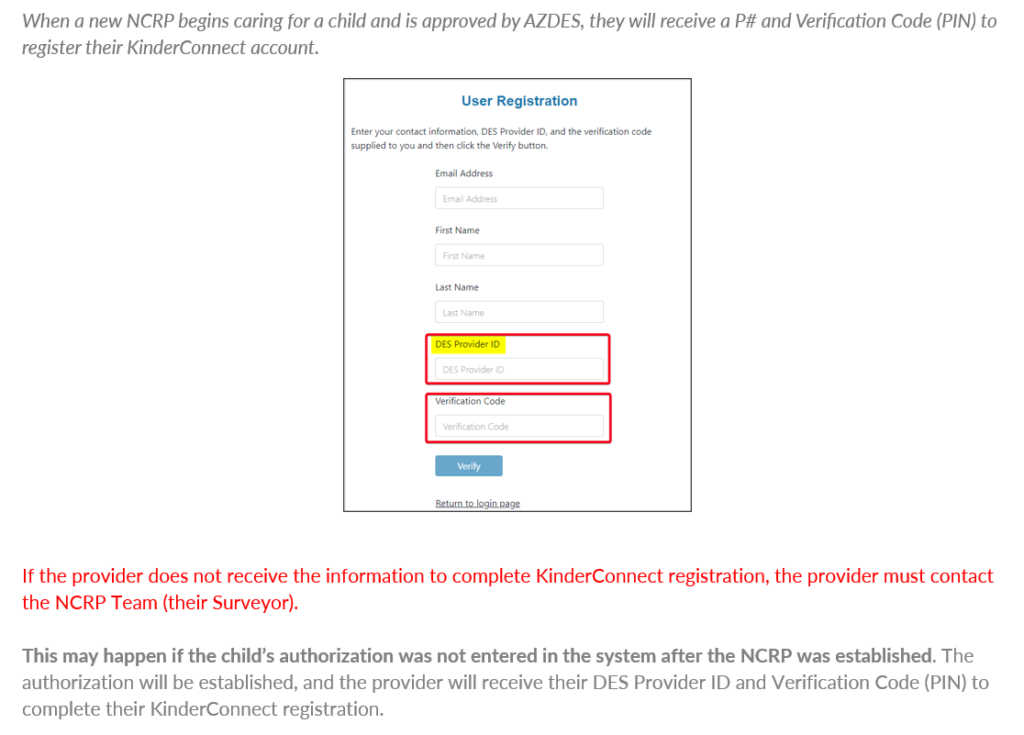
When a new NCRP begins caring for a child and is approved by AZDES, they will paper bill for the dates they began caring for the child to the end of the month that they receive their approval to care for the child.
When the provider receives the authorization approval, they will paper bill for the date that the authorization began to the 1st of the following month. Beginning the 1st of the next month, the provider and sponsor will use the CCES for attendance.
Example:
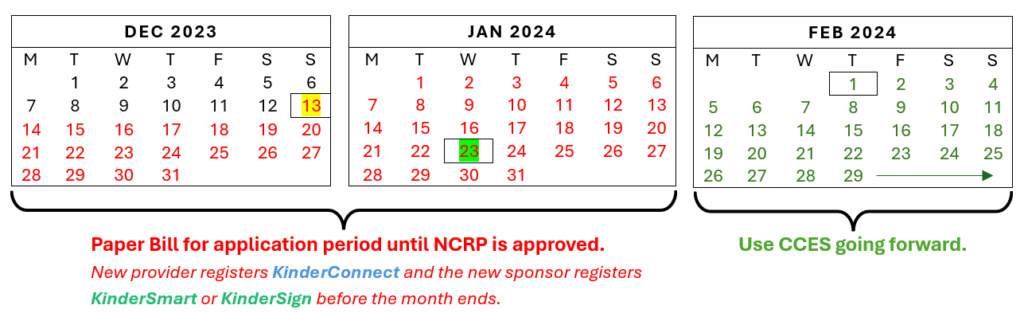
- A parent contacts their Eligibility Specialist on 12/18/2023 and reports that her mother is caring for her daughter and wants the mother to get paid for caring for her.
- The mother has already been caring for the child since 12/13/23.
- On 1/23/24, NCRP is approved and can bill for childcare beginning 12/13/23
Example Process:
Step 1: After 1/31/24, NCRP will paper bill for 12/13/23 to 1/31/24 (month of December and January)
Step 2: After 1/23/24, NCRP will receive a Provider ID and Verification Code (PIN) to register their account in KinderConnect. The new Sponsor will register with KinderSmart or KinderSign.
Step 3: The NCRP and Sponsor will begin using the CCES for attendance from 2/1/24 and submit attendance electronically going forward.
Example Process:
Step 1: After 1/31/24, NCRP will paper bill for 12/13/23 to 1/31/24 (month of December and January)
Step 2: After 1/23/24, NCRP will receive a Provider ID and Verification Code (PIN) to register their account in KinderConnect. The new Sponsor will register with KinderSmart or KinderSign.
Step 3: The NCRP and Sponsor will begin using the CCES for attendance from 2/1/24 and submit attendance electronically going forward.
Unable to Register/Authorization Certificate Not Received
ACTION STEPS:
- NCRP should notify their Surveyor or NCRP team that they have not received their DES Provider ID or their Verification Code (PIN)
- The authorization will be completed and the DES Provider ID and Verification Code (PIN) will be sent to the NCRP
- NCRP will complete their registration in KinderConnect
- The Sponsor will register KinderSmart or KinderSign to begin recording electronic attendance
- NCRP will submit the monthly attendance when the month is over.
Unable to Enter Attendance in KinderSmart/KinderSign or KinderConnect
Child Authorization Not Received/Child Not in KinderConnect
If an NCRP is authorized for care of an additional child, but the child does not appear on the paper billing form or in KinderConnect, the authorization may not have been completed.
Existing Sponsors will not see the child listed in the KinderSmart child list and will not be able to enter attendance.
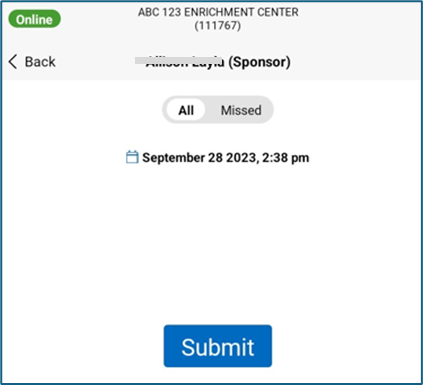
New Sponsors will not have an account in KinderConnect & will not be able to register KinderSmart.
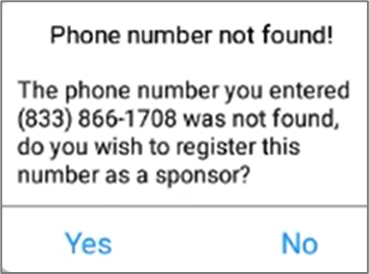
Their phone number will also not be recognized in KinderSign if the provider uses a tablet for attendance.
ACTION STEPS:
- NCRP should notify their Surveyor or NCRP team that the child is not authorized
- The authorization will be completed and will appear in KinderConnect
- NCRP will backdate the sign in/out records for the child in KinderConnect
- The Sponsor will register KinderSmart Arizona on their smartphone and continue to enter attendance going forward.
- NCRP will submit the monthly attendance when the month is over.
Authorization is Stopped and Restarted (Continuous, No Gap)
Expiration of NCRP PRA (Provider Registration Agreement)
An NCRP PRA is expiring as of February 13, 2025 (PRA is good for one year) but the child(ren) authorization(s) have not expired.
- A ten day notice is sent to the NCRP
- The family is also notified of the stop on the authorization.
- A parent cannot sign in/out using KinderSign/KinderSmart without the authorization.
- The authorization in KinderConnect will show that it is stopped, meaning the authorization will show the last day the child was authorized.
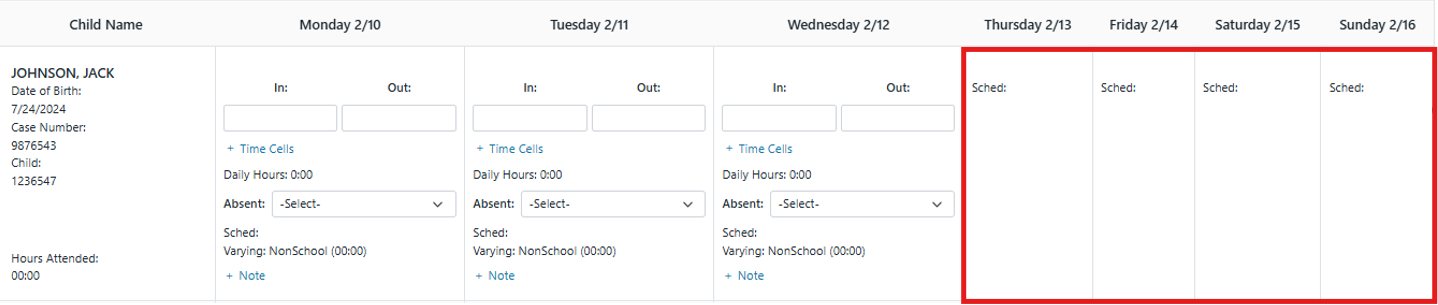
When the NCRP renews the PRA within the ten day timeframe, the authorization is reinstated to the PRA expiration date (the authorization is continuous).
- NCRP renews the PRA
- NCRP team will contact Family Support and Eligibility Specialist to restart the authorization.
- The new authorization for the child(ren) will once again show in KinderConnect, including the days during which the authorization was stopped
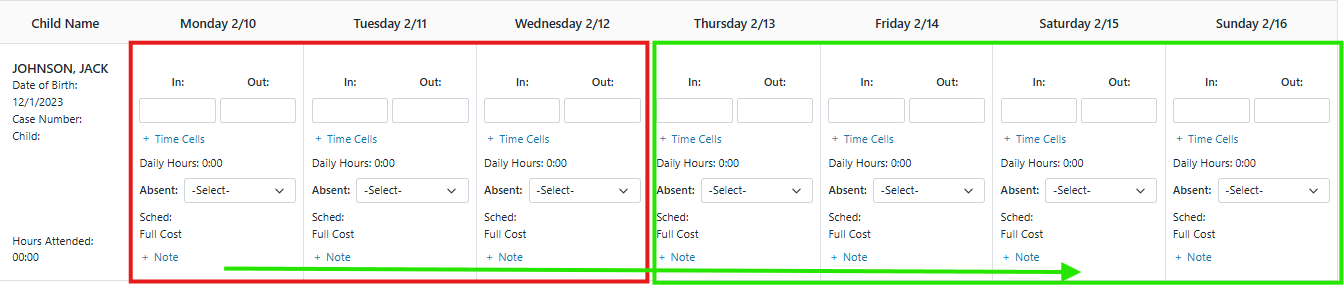
- The NCRP will backdate the sign in/out records for the authorized child in KinderConnect for the days that the authorization was stopped
- NCRP will submit the monthly attendance when the month is over.
Family Needs to Report New Income
A family is required to submit verification of new employment/income and has to provide this within ten days.
- The NCRP is notified verbally and a notice of a stopped authorization is sent via mail to the NCRP.
- The authorization in KinderConnect will show that it is stopped, meaning the authorization will show the last day the child was authorized.
- A parent cannot sign in/out using KinderSign/KinderSmart without the authorization.
The family submits the verification of new employment/income within the 10 days
- The authorization is reinstated and will show in KinderConnect once again, including the days for which the authorization was stopped.
- The NCRP will backdate the sign in/out records for the authorized child in KinderConnect for the days that the authorization was stopped
- NCRP will submit the monthly attendance when the month is over.
Authorization is Stopped and Restarted At a Later Date (Not Continuous)
Family Did Not Provide Required Information within 10 Days
A change was reported by the Family and a ten day stop was put into effect.
- The family did not provide the required information within the 10 day period.
- The Family Support and Eligibility Specialist closes the authorization after the 10 day period.
- The NCRP receives a verbal notice of the closed authorization and is notified with a letter via mail.
- A parent can no longer sign in/out using KinderSign/KinderSmart without the authorization.
The Family reapplies and a new authorization is established with a new start date.
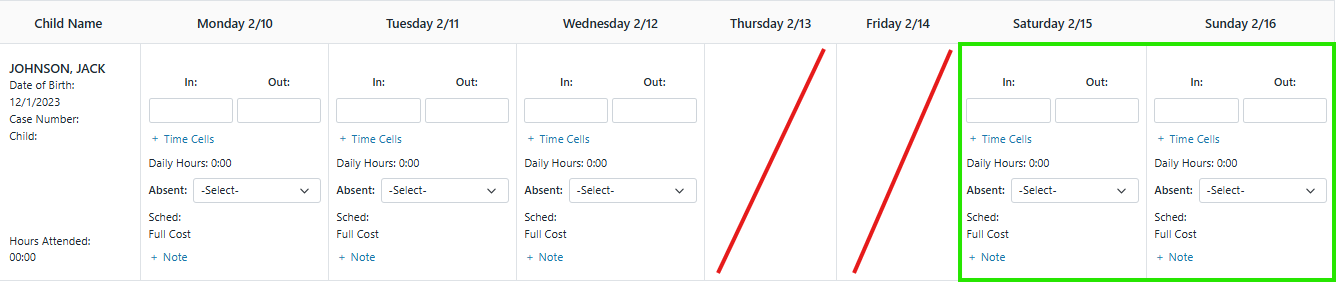
- The parent resumes entering attendance as of the start date of the new authorization.
- The NCRP cannot bill for the days where there was no authorization.
- The NCRP submits the attendance that is on record in KinderConnect for the month for billing.
Please dial 833-859-3433 or email us at SupportAZ@KinderSystems.com and one of our representatives will gladly assist you. Support staff are available from 6:00 AM - Midnight Mountain Time, 7 days a week.