
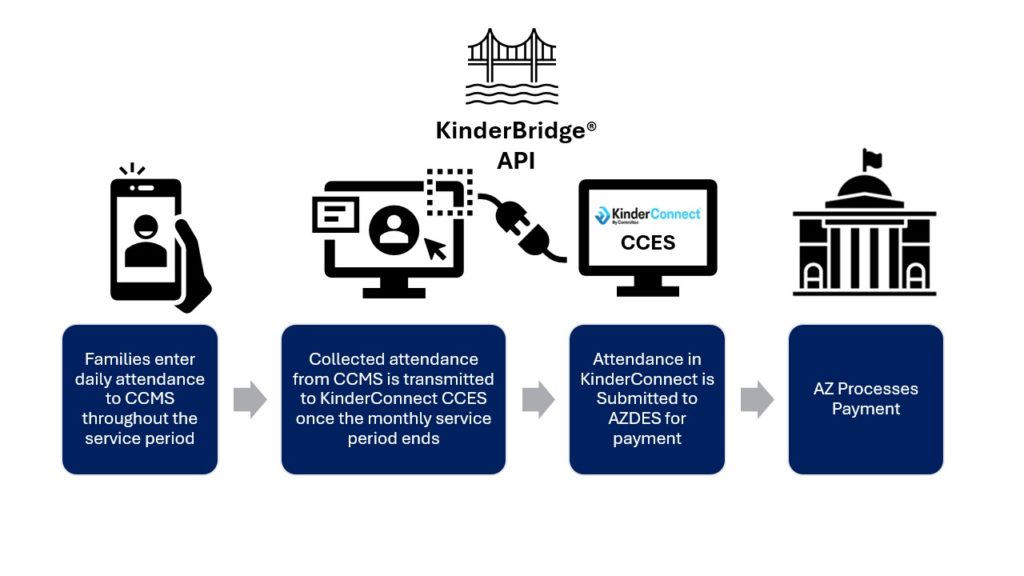
Kindersystems® has developed KinderBridge®, an API that facilitates the transfer of attendance data to KinderConnect® by CCMS vendors. The integration process is designed to be completed within 60 days, but it’s subject to the CCMS’s availability to start allocating resources.
Here’s a breakdown of the process:
- Sign an NDA & Schedule an Introductory Call:
a. Kindly provide us with the name, email, and position of the person to whom we should send the NDA. You can send this information to partners@controltec.com.
b. Schedule a 15-minute call by clicking here to discuss the process and the next steps.
- Deliver API Specification & Provide Sandbox Access:
KinderSystems will provide the CCMS with the API specification and documentation. The CCMS will receive OIDC credentials to connect with the KinderSystems sandbox environment.
- Validate Test Cases in Sandbox:
KinderSystems will provide ten user cases to test the integration. Once the CCMS submits the test case data, it will audit the received data. If any inconsistencies are identified during this process, KinderSystems may request additional data transmission as necessary. This step must be fully completed to proceed to the next step in the certification process.
- Validate Cases with PROD data in UAT:
Once the necessary test cases are completed in the Sandbox environment, KinderSystems will provide CCMS with the required credentials and endpoints to access a lower environment in Arizona, known as Arizona UAT. This environment is an exact replica of the production (PROD) environment. In this lower environment, the same scenarios tested in the Sandbox will be run, but with real data.
KinderSystems will request attendance data for the previous months to perform this verification. CCMS needs to select at least three providers that are already working with them and are registered as subsidy providers. Attendance records from these providers should then be transferred into Arizona UAT, covering at least three months of attendance data.
There are two main goals for this test:
- Technical integration work—i.e., making accurate calls to the API based on the spec and use cases provided.
- Operational tests – These are not necessarily predicated on a correct integration since this will be mostly assumed to be working as expected. Instead, they are intended to identify any workflow issues that may be introduced by system users. Examples:
a. The users are not properly logging absences
b. The users are creating incomplete time pairs (only an in, without an out, or the reverse)
c. The users are creating overlapping time pairs (how could a child be in two places at the same time)
5. Validate process end-to-end in UAT:
Once the transmission of attendance into UAT has been verified, the CCMS needs to submit the attendance to DES from KinderSystems. KinderSystems will train the CCMS on how to execute this process. The goal is to compare the payments made in the past against the payment process on the UAT testing.
DES expects to achieve 90% accuracy in order to pass the test.
- Going live:
Once the CCMS is approved and meets all requirements, the selected providers will need to assist with training and onboarding sessions with KinderSystems. After the training is finished, providers will be able to start submitting subsidy attendance through KinderSystems in the next available month.
CCMS must provide a support contact for future troubleshooting. Also, it is suggested that user-friendly documentation/videos be created to explain KinderConnect integration.
If you have any questions or doubts about this process, please do not hesitate to contact us at partners@controltec.com.
Best regards,
KinderSystem Team
Frequently Asked Questions
- What do we do with attendance records that are not accepted by the API (error code or something else)?
If one transaction in the batch fails, the API will reject the whole batch. We do not indicate what transaction/data point failed.
- What happens if we send the same “uploadAttendance” with the same data?
The call will error out.
- Do we need to do any historical syncing of attendance data?
No need unless integration takes a long time.
- What is the process when a new child or sponsor gets created in the provider system?
You can find out if the child exists in our system via the RequestChildList or RequestChildID endpoints. Most vendors use Children.
- Is the provider allowed to store Agency ID and Provider ID in their system?
Yes.
- How frequently should we send attendance data to KinderConnect?
The provider should manually submit in the first week of the next month for the past month. This gives them a chance to verify the data before submitting it.
- Is there a way to get sample ‘responses’ of all APIs?
There are sample responses in the Swagger documentation, otherwise, you can test in the sandbox.
- In the “uploadAttendance” API what do the following keys in the data mean: “ModifyCount” and “Note”?
Modify Count – description: the count of changes made to the attendance of this transaction that a Provider (or parent) made prior to uploading attendance through this web service. If ModifyCount is present, KinderConnect reports this number as the count of Provider overrides. Most vendors do not use this at all.
Note – primarily used for absences to indicate why the child was absent.
- Does KinderConnect maintain a staging or testing environment for us to start sending test data
We have the sandbox for the provider to test on it. We can also help the provider to test in staging once they pass the initial tests in the sandbox.
- How the API calls functions for the following case: The child is marked absent for an appointment at the beginning of the day
Post an absence through the attendance endpoint, post a note through the same endpoint. They can be two calls, but most vendors use a single call for this scenario.
- Are there any API endpoints that return the absence record for a given child?
No, you cannot retrieve absences or existing time pairs in our system.
- API authentication (other than the provider’s password)
We use OIDC to secure calls to the web service, calls to the specific provider records use the provider/group password. The provider/group password is generated by our support team.
13. The API cannot integrate with KinderSign.
KinderSign allows families, child care providers, and centers to sign children in and out of care with an app that’s compatible with iPad or Android tablets.